Smart Classroom Digital Board - What Schools Should Buy
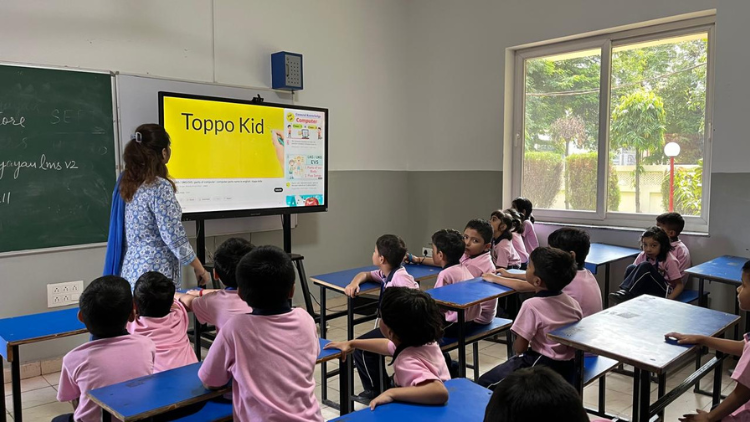
Why Schools Are Moving Towards Smart Digital Boards

Key Features Schools Should Look For
1. Large and Clear Display

2. Multi-Touch Interactivity

3. Built-in Teaching Tools

4. Reliable Performance and Durability

Important Factors Schools Should Consider Before Buying

Teacher-Friendly Interface

Content Compatibility

Training and Teacher Support

Long-Term Value for Schools

Real Classroom Impact

Conclusion
Frequently Asked Questions (FAQs)
A smart classroom digital board is an advanced teaching screen that allows teachers to present lessons in an interactive way. It works like a large touchscreen computer placed in the classroom. Teachers can display videos, presentations, diagrams, and digital textbooks directly on the board. They can also write notes, draw diagrams, and highlight important points during the lesson. Many boards support internet access, which helps teachers find educational resources instantly. Students can also interact with the board by solving questions or participating in activities. This technology makes lessons more visual, interactive, and engaging compared to traditional chalkboards or whiteboards.
Schools replace traditional chalkboards and whiteboards because digital boards improve the learning experience. A digital board allows teachers to explain complex concepts with images, videos, animations, and interactive diagrams. This makes lessons easier to understand. Students stay more focused because visual learning keeps them interested. Teachers also save time because they can prepare digital lessons in advance and reuse them whenever needed. Digital boards also reduce chalk dust and make classrooms cleaner. Overall, schools adopt this technology because it improves teaching quality, increases student participation, and helps create a modern learning environment that matches today's digital world.
A digital board makes lessons more interactive and exciting for students. Instead of only listening to lectures, students can watch videos, see animated explanations, and participate in live activities on the board. Teachers can ask students to come to the board to solve problems, move objects, or highlight answers. This involvement makes students feel more interested in the lesson. Visual content also helps students understand complex topics quickly. For example, science experiments, geography maps, and historical timelines become much easier to explain with digital visuals. When students interact with the lesson directly, they stay more attentive and remember concepts better.
Schools should evaluate several important features before buying a smart classroom digital board. First, they should check the display size and resolution to ensure students at the back of the classroom can see clearly. Multi-touch capability is also important because it allows teachers and students to interact with the board simultaneously. Schools should also check built-in teaching tools such as digital whiteboard features, annotation tools, and screen recording. Strong connectivity options like HDMI, USB, and wireless screen sharing also improve usability. Finally, schools should choose a reliable brand that offers good warranty, training support, and long-term durability for daily classroom use.
Most modern smart classroom digital boards are designed to be simple and user-friendly. Teachers who can use a smartphone or laptop can quickly learn how to use a digital board. The interface usually includes easy tools for writing, drawing, highlighting, and opening presentations. Many boards also come with built-in teaching software that helps teachers create interactive lessons. Schools usually provide basic training to help teachers become comfortable with the system. Once teachers start using it regularly, they often find that the digital board saves time and makes teaching easier. Within a few weeks, most teachers feel confident using it in their daily lessons.
A smart classroom digital board helps teachers deliver lessons more clearly and effectively. Teachers can show videos, animations, and diagrams that explain complex topics visually. This improves student understanding. Teachers can also save lesson notes, presentations, and teaching materials digitally, which helps them reuse content in future classes. They can highlight key points and annotate directly on the screen while teaching. Some boards even allow teachers to record lessons for later review. These features help teachers explain concepts better, manage classroom time efficiently, and create more engaging learning experiences for students.
Yes, students can interact directly with most smart classroom digital boards. These boards support touchscreen technology, which allows students to write, draw, drag objects, or solve questions directly on the screen. Teachers often invite students to participate in classroom activities using the board. For example, students can complete math problems, match vocabulary words, or label diagrams during lessons. This interactive participation encourages students to think actively instead of only listening to the teacher. When students engage directly with learning materials, they develop better understanding and confidence. Interactive activities also make classrooms more lively and collaborative.
Internet access helps unlock the full potential of a smart classroom digital board, but teachers can still use it without internet. Many boards allow teachers to display offline presentations, PDFs, images, and videos stored on a computer or USB drive. Teachers can also write notes and draw diagrams using built-in whiteboard tools. However, when the board connects to the internet, teachers can access online educational platforms, digital libraries, and interactive learning resources. This greatly expands the variety of teaching materials available. While internet improves functionality, schools can still use digital boards effectively even with limited connectivity.
A high-quality smart classroom digital board usually lasts between 7 to 10 years with proper care and maintenance. Most reputable brands design these boards for continuous classroom usage. The display panels are durable and built to handle daily teaching activities. Schools should choose boards that offer strong build quality and a good warranty period. Regular software updates and basic maintenance also help keep the board running smoothly for many years. Because the technology supports digital content and modern teaching methods, schools often see long-term value from this investment as it continues improving classroom learning for several academic sessions.
Yes, investing in a smart classroom digital board can be highly beneficial for schools. It improves teaching efficiency, enhances student engagement, and supports modern digital learning methods. Teachers can present lessons visually, which helps students understand concepts faster. Students also participate more actively when they interact with digital content on the board. Over time, this technology helps schools build a more innovative and future-ready learning environment. When schools choose the right board with reliable performance and teacher support, the investment pays off through better classroom experiences, improved learning outcomes, and stronger student interest in academic subjects.
Related post:
- How Teachers Can Save Time Using an Interactive Flat Panel
- How Interactive Flat Panels Improve School Branding
- Why Every School Should Invest in Interactive Flat Panels in 2026
- Interactive Flat Panel with EDLA — Why Schools Should Prefer It?
- Is Your School Ready for AI? 3 Ways Interactive Panels Will Evolve by 2027
- Why Schools Need an Interactive Display Board
- Sustainable Interactive Flat Panel: Green Tech Solutions for Schools
- Addressing Screen Fatigue: Designing Interactive Panel Use for Student Health and Focus
- Teacher-Influencers’ Classroom Setup: IFPs for Social Media Edutainment
- Meeting Gen Z’s AV Expectations: How IFPs Are Evolving Hybrid Classrooms