5 Reasons Why Businesses Are Switching from Traditional Computers to All-in-One PCs
What Is an All-in-One PC?

Why Businesses Are Moving Beyond Traditional Computers
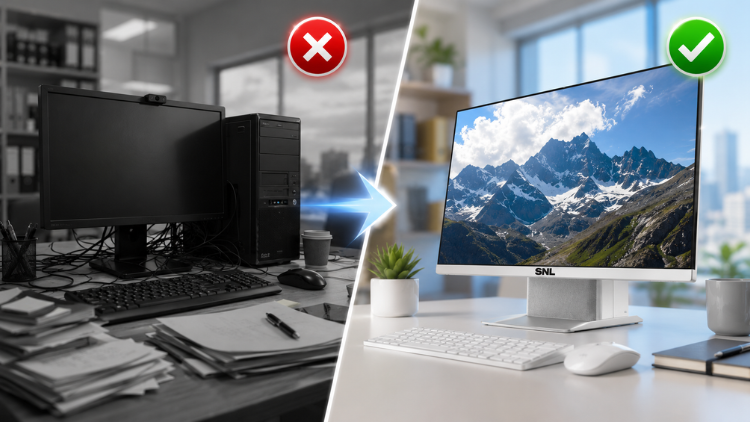
Reason 1: Space-Saving and Clutter-Free Workstations

- Separate CPU tower
- Monitor
- Multiple power cables
- Display cables
- Peripheral connections
Real-World Example
Reason 2: Faster Deployment and Simplified IT Management

- Faster office expansion
- Reduced installation costs
- Easier desk relocation
- Improved cable organization
- Lower maintenance complexity
Practical Business Scenario
Reason 3: Improved Employee Productivity and User Experience

- Productivity Benefits
- Faster system startup
- Smooth multitasking
- Better video conferencing
- Cleaner workspace
- Reduced distractions
Workplace Example
Reason 4: Professional Design with Lower Total Cost of Ownership

- Long-Term Business Advantages
- Lower cable replacement costs
- Reduced maintenance requirements
- Better energy efficiency
- Smaller office footprint
- Professional office aesthetics
Reason 5: Built for Modern Hybrid Work Environments

- Built-in speakers
- Latest Intel/AMD processors
- Noise-reducing microphones
- Sleek and modern design
- Wi-Fi connectivity
- Bluetooth support
- USB connectivity
Business Example
All-in-One PC vs Traditional Computer: A Quick Comparison
| Features | All in One PC | Traditional Computer |
| Desk Space | Excellent | Requires More Space |
| Cable Management | Minimal | Multiple Cables |
| Setup Time | Very Fast | Longer Installation |
| Maintainance | Easier | More Components to Manage |
| Professional Appearance | Modern and Clean | Depends on Configuration |
| Hybrid Work Features | Usually Integrated | Often Requires Additional Devices |
| Energy Efficiency | Generally Better | Varies by Hardware |
Which Businesses Benefit the Most from All-in-One PCs?

- Corporate offices
- Startups
- Educational institutions
- Healthcare clinics
- Reception areas
- Retail businesses
- Government offices
- Financial institutions
- Customer support centers
- Co-working spaces
Key Factors to Consider Before Buying

Performance Requirements
Display Size
Connectivity
Upgradeability
Warranty and Support
Introducing SNL AIO PC

SNL All-in-One PC is a cutting-edge aio pc aimed to provide a seamless and immersive computing experience. It combines all the computer parts into one sleek monitor, saving space and reducing clutter on your desk. The sleek design adds a modern touch to any environment.
Key Features
- Large Full HD Display.
- Powerful Intel Processor for smooth performance.
- Built-in speakers.
- Sleek and modern design.
- Branded internal parts and components (Display is of LG and BOE).
- 1-year on-site warranty.
Conclusion
Frequently Asked Questions (FAQs)
An all in one pc is a modern computer that combines the display, processor, storage, memory, and other essential hardware into a single unit. Unlike a traditional desktop with a separate CPU tower, it requires fewer cables and takes up less desk space. Businesses prefer this design because it creates organized workstations, simplifies installation, and reduces maintenance. It is ideal for offices, schools, healthcare facilities, reception areas, and organizations looking for a clean, professional, and space-efficient computing solution.
An all in one pc offers several business advantages, including a clutter-free workspace, quick installation, energy efficiency, and easier maintenance. Employees benefit from integrated peripherals and a streamlined setup that supports daily tasks without requiring multiple external devices. IT teams also spend less time managing cables and hardware. Compared to a traditional computer, it provides a more professional appearance and improves overall workplace organization, making it an excellent choice for modern offices and corporate environments.
The answer depends on business needs. An all in one pc is better for organizations that prioritize workspace efficiency, professional design, simplified management, and hybrid collaboration. A traditional desktop computer may offer greater hardware customization for specialized workloads like advanced engineering or high-end gaming. However, for everyday business operations, accounting, customer service, education, administration, and office productivity, an all in one pc delivers excellent performance while reducing desk clutter and maintenance requirements.
Yes. An all in one pc is specifically designed to meet the needs of modern businesses. It supports productivity applications, cloud-based software, video conferencing, and day-to-day office tasks with ease. Its compact design makes it ideal for corporate offices, startups, schools, hospitals, government departments, retail stores, and financial institutions. Businesses also appreciate the professional appearance, easier deployment, and lower maintenance requirements compared to a conventional desktop computer setup.
Before purchasing an all in one pc, businesses should evaluate processor performance, RAM capacity, storage type, display size, connectivity options, security features, warranty, and future upgrade possibilities. It is also important to match the computer specifications with business workloads. For example, graphic designers may require higher-performance hardware, while administrative teams can work efficiently with standard office configurations. Choosing a trusted brand with reliable after-sales support ensures long-term value and business continuity.
Businesses are replacing traditional desktop computer systems with an all in one pc because it offers better space utilization, faster deployment, simplified IT management, and a cleaner workspace. It also reduces cable clutter and supports modern collaboration through integrated microphones, and speakers. For startups, enterprises, and educational institutions, these benefits improve employee productivity while lowering maintenance costs. As workplaces become more digital and hybrid, an all in one pc provides a practical and future-ready solution.
Yes. Most modern all in one pc models are built for hybrid work environments. They often include integrated microphones, speakers, Wi-Fi, Bluetooth, and multiple connectivity options that make virtual meetings seamless. Employees can join video conferences without purchasing additional accessories, reducing setup complexity and costs. Whether teams work from the office or collaborate remotely, an all in one pc helps businesses maintain effective communication and improve workplace flexibility while delivering a smooth user experience.
Yes. An all in one pc simplifies IT management by reducing the number of hardware components and cables that require installation and maintenance. Because everything is integrated into one unit, troubleshooting becomes easier, deployment is faster, and desk organization improves. Businesses also spend less time configuring new workstations when expanding their teams. Compared to managing multiple traditional desktop computer systems, an all in one pc can lower operational costs and improve IT efficiency over time.
Many industries benefit from adopting an all in one pc, including education, healthcare, banking, retail, hospitality, manufacturing, corporate offices, and government organizations. Businesses that require organized workstations, professional office aesthetics, and reliable daily performance find these systems particularly valuable. Reception desks, classrooms, customer service centers, and administrative departments also benefit from their compact footprint. An all in one pc provides a dependable computer solution that supports productivity across a wide range of professional environments.
Yes. Investing in an all in one pc can provide long-term value through reduced maintenance, lower power consumption, improved workspace efficiency, and simplified deployment. Businesses also benefit from integrated collaboration features that support hybrid work without additional hardware. While the initial investment may vary depending on specifications, the lower total cost of ownership often makes it a smart choice compared to maintaining multiple traditional desktop computer systems. For many organizations, it is a practical investment that supports future workplace needs.