7 Key Features to Look for When Choosing a 4K PTZ Camera
What Is a PTZ Camera?

Why Organizations Prefer PTZ Cameras
- Wider coverage with a single camera
- Remote operation and control
- Professional-looking video output
- Reduced equipment requirements
- Improved audience engagement
- Advanced automation through AI technologies
Why Choosing the Right 4K PTZ Camera Matters

1. Crystal-Clear Ultra HD Video Quality
- Ultra-HD resolution
- Excellent color accuracy
- Sharp image reproduction
- Consistent performance in different lighting conditions
2. Intelligent AI Auto Framing
- Maintains professional composition
- Reduces manual camera operation
- Improves viewer experience
- Keeps attention focused on participants
3. Hands-Free Gesture Control
- Zoom in
- Zoom out
- Start tracking
- Stop tracking
- Activate specific camera modes
4. Advanced AI-Based Subject Tracking
- Keeps presenters centered
- Eliminates manual adjustments
- Creates dynamic and engaging videos
- Improves professional presentation quality
5. Smooth and Precise Pan-Tilt-Zoom Performance
- Smooth pan transitions
- Accurate tilt control
- Responsive zoom functionality
- Quiet motor operation
6. One-Touch Preset Camera Positions
- Faster setup
- Consistent framing
- Improved operational efficiency
- Easy transitions between viewpoints
7. Versatility Across Multiple Use Cases
- Smart classrooms
- Webinars
- Hybrid meetings
- Corporate training
- Live streaming
- Studio recordings
- Educational institutions
- Conference rooms
How These Features Improve User Experience

- AI auto-framing reduces manual intervention.
- AI tracking keeps presenters visible at all times.
- Gesture control simplifies camera management.
- Presets accelerate room setup.
- 4K video improves visual clarity.
Common Mistakes to Avoid When Buying a PTZ Camera

Choosing Resolution Alone
Ignoring Automation Features
Overlooking Preset Functionality
Not Considering Future Needs
Focusing Only on Hardware Specifications
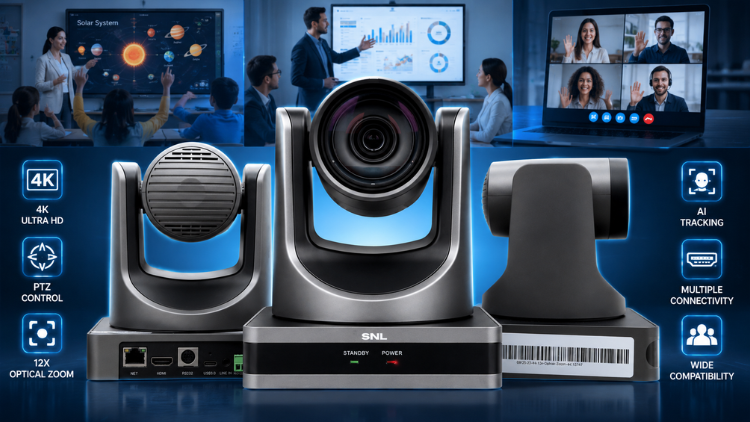
Introducing SNL 4K PTZ Cameras

Key benefits include:
- Ultra-clear 4K camera video output.
- AI auto framing.
- Gesture control.
- AI-based tracking.
- Smooth pan and tilt movement.
- Preset camera angles for lectures or meetings.
- Perfect for classrooms, webinars, and studio recordings.
Conclusion
Frequently Asked Questions (FAQs)
A ptz camera is a camera that can pan, tilt, and zoom remotely without requiring physical adjustments. Users can control the camera through a remote, software platform, or automated AI features. Modern PTZ cameras can automatically track presenters, adjust framing, and switch between preset positions. These capabilities make them ideal for classrooms, conference rooms, webinars, training sessions, and live events. A ptz camera provides greater flexibility than a traditional fixed camera because it covers larger spaces and captures multiple viewing angles using a single device.
A 4k camera delivers significantly higher image quality than a Full HD camera. It produces sharper visuals, clearer text, improved color accuracy, and better detail retention, especially in large classrooms and conference rooms. When viewers watch presentations, online lectures, or webinars, they can see content more clearly. Combining 4K resolution with PTZ functionality creates a powerful solution for professional communication. A 4k camera also helps future-proof your investment because 4K video has become the standard for modern business, education, and content creation environments.
The most important features in a ptz camera include ultra-HD video quality, AI auto framing, AI-based subject tracking, smooth pan-tilt-zoom movement, gesture control, preset camera positions, and compatibility with various communication platforms. These features improve both video quality and operational efficiency. Organizations should focus on practical performance rather than specifications alone. A camera that automates tracking and framing can save time and reduce manual work. The best ptz camera solutions combine intelligent automation with professional-grade imaging capabilities to support diverse applications.
AI auto framing uses artificial intelligence to detect people within the camera’s field of view and automatically adjust the framing. Instead of requiring manual camera adjustments, the system keeps participants properly positioned on screen. This feature proves especially useful during meetings, webinars, classrooms, and training sessions where participants may enter or leave the frame. AI auto framing helps maintain a professional appearance throughout the event. By automatically optimizing the camera view, a ptz camera improves viewer engagement while reducing the need for dedicated camera operators.
AI-based camera tracking is a feature that allows a ptz camera to automatically follow a speaker or presenter as they move around a room. The camera continuously identifies the subject and adjusts its position to keep them visible. This technology eliminates the need for manual tracking and creates a more dynamic viewing experience. AI tracking is particularly beneficial in classrooms, training centers, auditoriums, and live streaming environments. It ensures audiences remain focused on the presenter while maintaining consistent video quality and professional framing throughout the session.
Yes, a ptz camera is one of the most effective camera solutions for modern classrooms and educational institutions. It enables teachers to move freely while teaching, supports hybrid learning environments, and allows remote students to stay engaged. Features such as AI tracking, auto framing, and preset positions enhance lesson delivery and improve the learning experience. A 4k camera also ensures students can clearly view presentations, diagrams, and whiteboard content. Educational institutions increasingly use PTZ technology to support interactive and flexible teaching methods.
Preset camera positions allow users to save and instantly recall specific camera angles. This feature improves efficiency by eliminating the need to manually reposition the camera every time the viewing angle changes. In conference rooms, lecture halls, and training facilities, presets can be configured for speakers, audiences, presentation screens, and demonstration areas. With a single click, users can switch between these views. A ptz camera with preset functionality helps create smoother presentations, reduces setup time, and ensures consistent camera framing across multiple sessions.
A ptz camera improves webinars and online presentations by delivering professional video quality and intelligent automation. Features such as AI tracking and auto framing keep presenters visible and properly positioned without manual intervention. Smooth pan-tilt-zoom movement enhances the viewing experience, while 4K resolution ensures clear visuals. These capabilities help presenters focus on delivering content instead of managing camera operations. A 4k camera also improves audience engagement because viewers can clearly see facial expressions, demonstrations, presentation slides, and other visual content during virtual events.
Yes, a single ptz camera can support multiple use cases across education, business, and content creation. Organizations often use the same camera for webinars, hybrid meetings, corporate training, live streaming, presentations, and video recording. The combination of remote control, AI automation, and professional video quality makes PTZ cameras highly versatile. A 4k camera provides the image clarity required for all these applications while reducing the need to purchase separate cameras for different environments. This versatility makes PTZ technology a cost-effective long-term investment.
Many buyers focus only on price or resolution and overlook important features that affect daily performance. When evaluating a ptz camera, consider AI tracking, auto framing, gesture control, preset positions, and movement accuracy. Avoid selecting a camera solely because it offers 4K resolution. A high-quality 4k camera should also provide reliable automation and smooth operation. Buyers should evaluate their future requirements, room size, intended applications, and integration needs. Choosing a feature-rich solution typically delivers better long-term value and a superior user experience.