Interactive Flat Panel for Classroom — Best Use Cases in Daily Teaching
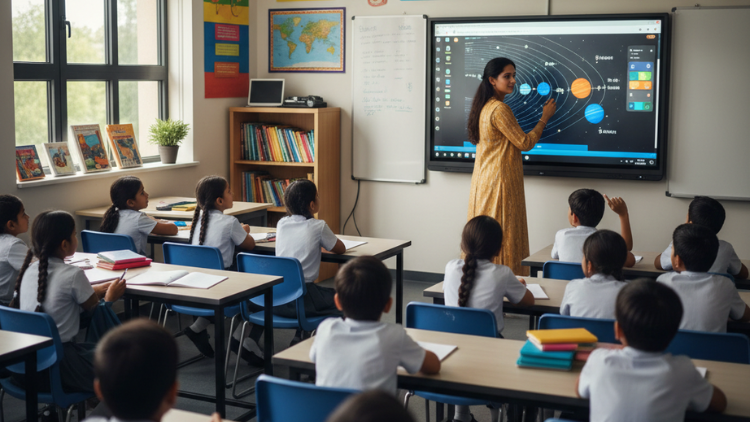
1. Explaining Complex Topics with Visual Clarity

- Draw diagrams clearly
- Zoom into images
- Play short concept videos
- Highlight key points instantly
2. Daily Lesson Planning and Digital Notes

- Save notes after every class
- Share notes with absent students
- Reuse content next year
- Export notes as PDF
3. Conducting Interactive Quizzes

- Display multiple-choice questions
- Ask students to come forward and tap answers
- Run polls
- Show instant results
4. Teaching with Real-Time Internet Content

- Show current news in Civics class
- Display live weather updates in Geography
- Show real-world applications in Physics
5. Online and Hybrid Learning Support

- Conduct live online classes
- Record lectures
- Share screen content
- Use video conferencing apps
6. Group Activities and Collaborative Learning

- Solve puzzles on screen
- Drag and drop answers
- Create mind maps
- Present group projects
7. Language Learning and Pronunciation Practice

- Play audio clips
- Show subtitles
- Pause and repeat dialogues
- Record student voices
8. Assessment and Instant Feedback

- Conduct short tests
- Collect responses
- Show correct answers immediately
- Identify weak areas
9. Using Educational Apps

- Educational apps
- Simulation tools
- Practice exercises
- Show science experiments through simulations
- Demonstrate maths problems step-by-step
- Use animated stories for primary classes
10. Reducing Teacher Burnout

- Save previous lessons
- Use ready-made templates
- Access stored materials
- Organize content easily
11. Parent Presentations and School Meetings

- PTM meetings
- Teacher training sessions
- School presentations
Conclusion
Frequently Asked Questions (FAQs)
No, a digital board is not difficult to use. Most interactive panels come with simple touch features, just like a smartphone. Teachers can write with a stylus or even their finger. The interface is user-friendly, and most schools provide basic training. Once teachers start using it daily, they become comfortable within a few days. They can open presentations, browse the internet, and play videos easily. Many panels also allow screen recording and note saving with one click. Even teachers who are not very tech-savvy can quickly adapt and feel confident while using it in the classroom.
An interactive flat panel improves daily teaching by making lessons more visual and engaging. Teachers can show diagrams, animations, and real-life examples instead of only writing on the board. This helps students understand concepts faster. It also saves time because teachers can prepare notes in advance and reuse them. They can conduct quizzes, highlight important points, and correct mistakes instantly. In Indian classrooms where student strength is high, this tool helps teachers maintain attention and manage time effectively. It supports both traditional and modern teaching methods, which makes it suitable for CBSE, ICSE, and state board schools.
A smart board for school increases student engagement because it allows students to participate actively. Instead of sitting quietly, students can come forward and solve problems on the screen. Teachers can run live quizzes, polls, and drag-and-drop activities. Visual learning also improves attention because students enjoy colorful graphics and videos. Interactive lessons reduce boredom and make even complex subjects interesting. When students physically interact with the screen, they feel involved in the lesson. This active participation builds confidence, improves understanding, and creates a positive classroom environment where learning feels exciting.
Yes, interactive flat panels can support exam preparation effectively. Teachers can revise chapters using visual summaries, mind maps, and quick quizzes. They can highlight important questions and solve sample papers on the screen. Students understand step-by-step solutions clearly because teachers can zoom, underline, and explain key steps. Teachers can also save revision notes and share them with students digitally. This helps students review important topics at home. Quick assessments help teachers identify weak areas and focus on improvement. Overall, it makes revision sessions more structured and productive.
Interactive flat panels reduce teacher workload by saving time and effort. Teachers no longer need to write the same notes repeatedly on different boards. They can prepare once and reuse content. They can save class notes and share them digitally instead of rewriting them. Automated quizzes and instant results reduce manual checking work. Teachers can organize files, lesson plans, and presentations in one place. This reduces stress and improves efficiency. When teachers save time on repetitive tasks, they can focus more on mentoring students and improving teaching quality.
Yes, it is highly suitable for primary school students. Young children learn better through visuals, sounds, and interactive activities. Teachers can use animated stories, phonics videos, and colorful diagrams to make lessons fun. They can conduct simple drag-and-drop activities that improve understanding. Interactive storytelling keeps students excited and attentive. Instead of memorizing, children learn through experience and participation. This improves retention and builds strong foundational skills. Teachers can also control content easily to ensure safe and focused learning.
Yes, interactive flat panels support online and hybrid classes smoothly. Teachers can connect video conferencing apps directly on the panel. They can share their screen, conduct live classes, and record sessions. If a student misses class, the teacher can share recorded lessons. This ensures continuity in learning. Hybrid classrooms become easier because teachers can teach both offline and online students at the same time. This flexibility makes the system future-ready and reliable during emergencies or unexpected closures.
Schools should check display quality, touch response, sound clarity, storage capacity, and operating system compatibility. They should ensure the panel supports educational apps and K–12 content aligned with Indian boards. Strong after-sales service and warranty are also important. Schools should choose panels that receive regular software updates. Multi-touch support helps during collaborative learning. Built-in speakers and screen recording features add value. A good installation and training support system also ensures smooth usage for teachers.
Yes, it can be cost-effective in the long run. Instead of maintaining projectors, computers, and traditional boards separately, schools can use one integrated solution. It reduces maintenance costs and electricity consumption compared to projectors. Durable screens last for many years. Schools also save money on printing and paper materials because teachers can share notes digitally. When used properly, it delivers high return on investment through better learning outcomes and improved classroom efficiency.
Interactive learning prepares students for a digital world. Students become comfortable using technology, presenting ideas, and collaborating digitally. They develop problem-solving and critical thinking skills through interactive activities. Exposure to multimedia content improves understanding and creativity. Since most competitive exams and careers now require digital skills, early exposure helps students stay ahead. By integrating technology into daily teaching, schools create a modern learning environment that matches global education standards and prepares students for future challenges.