Windows-only software
Lab, exam and legacy ERP applications
Run software that only exists for Windows, right on the smart board.
Revolutionizing Education for a Brighter Tomorrow
Add an optional OPS (Open Pluggable Specification) module to instantly transform your IFP into a powerful Windows PC. The slide-in PC module fits neatly into the dedicated slot at the back of the panel, delivering a complete Windows experience without an external desktop tower or messy cables.
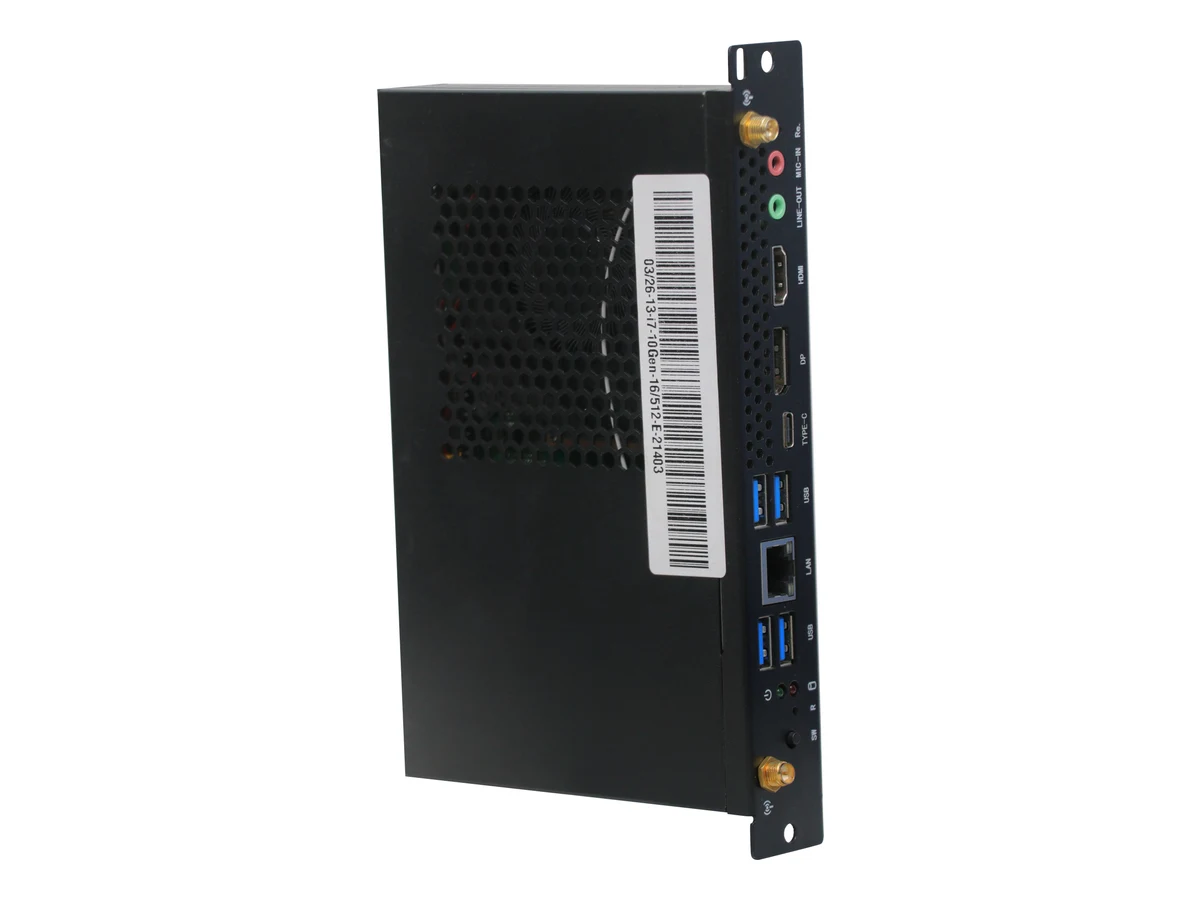
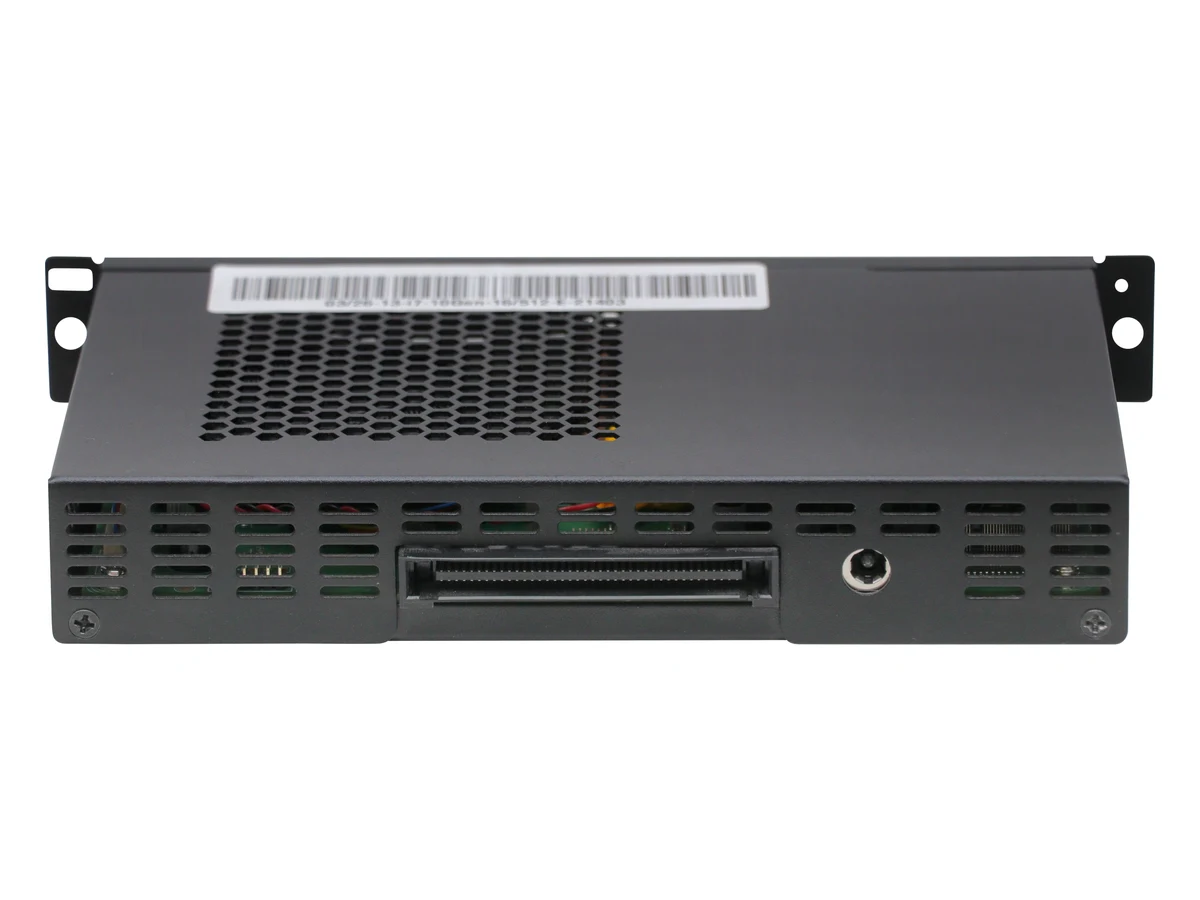
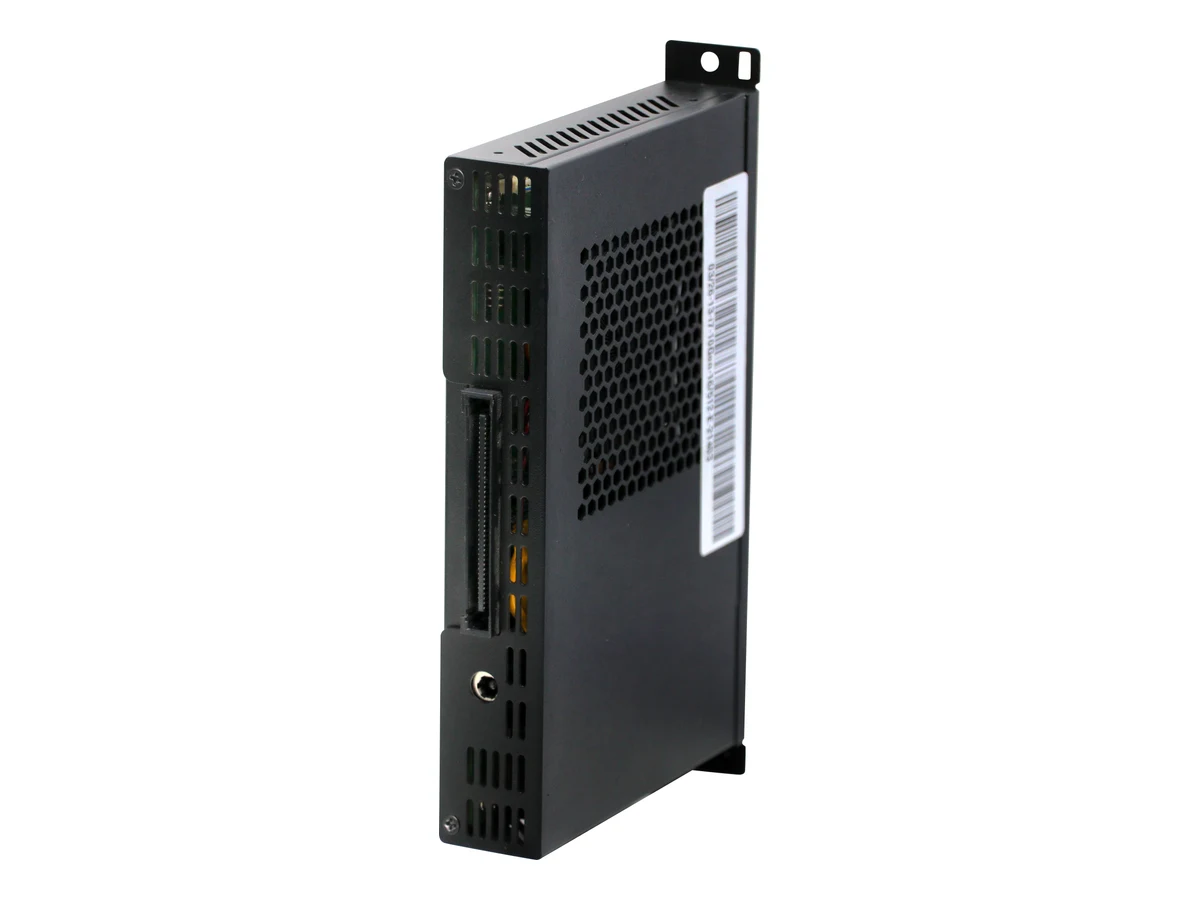
In computing, OPS is a standard for a small computer, an Open Pluggable Specification PC or OPS PC, that slides into a slot on the back of a display. Intel, NEC and Microsoft introduced it in 2010 so that any compliant module fits any compliant display. Think of it as a full PC on a card, built into your smart board.
The module’s size and its 80-pin connector are fixed by the specification, so it plugs into the panel the same way every time.
Power, video (HDMI/DVI and DisplayPort), USB, audio and control signals all pass through it, so no external cables are needed.
Each module has its own processor, memory, storage and operating system, so it runs on its own, independent of the panel’s Android.
SNL’s Interactive Flat Panels, the digital smart boards and touchscreen boards used in schools, run Android on their own. An OPS module adds a Windows PC for the work that needs one.
Lab, exam and legacy ERP applications
Run software that only exists for Windows, right on the smart board.
Its own processor, memory and storage
No laptop to carry into the room or connect before every lesson.
Power and video pass through the slot
One internal connector replaces the cables a separate PC would need.
Android 14, touch and the AI Teaching Suite
Adding OPS takes nothing away from the panel.
A standard slot and connector
Replace or upgrade the computer without replacing the panel.
Classrooms, labs, exam halls, meeting rooms
For any touchscreen board that needs a permanent Windows machine.
The OPS slot is on the back of the panel. The module’s connector meets the panel’s connector, and its plate sits flush with the back.
Power, video, USB, audio and control signals pass through the one connector. There is no separate PC tower and no cable run to plan around.
Windows applications appear on the touchscreen. The SNL IFP specification lists 40-point touch under Windows and 20-point under Android.
The panel’s Android 14 environment, touch and AI Teaching Suite keep working exactly as before. OPS is an extra source, not a replacement.
The slot-in Windows PC for SNL Interactive Flat Panels. It is an optional add-on: fit one only where you need a permanent Windows machine on the panel.
SNL OPS Module | Intel Core i5 / i7 | Windows Ready | 4 × USB | LAN | Type-C | DisplayPort | HDMI | Line-out & Mic-in
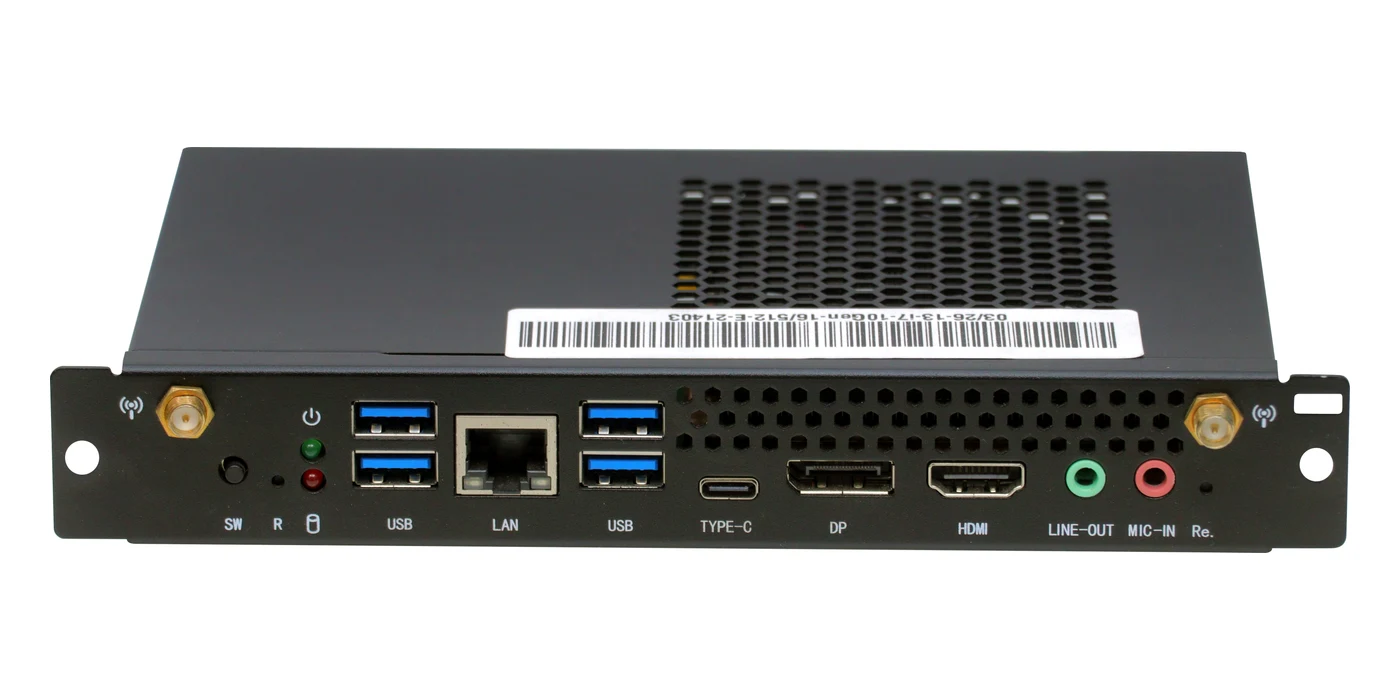
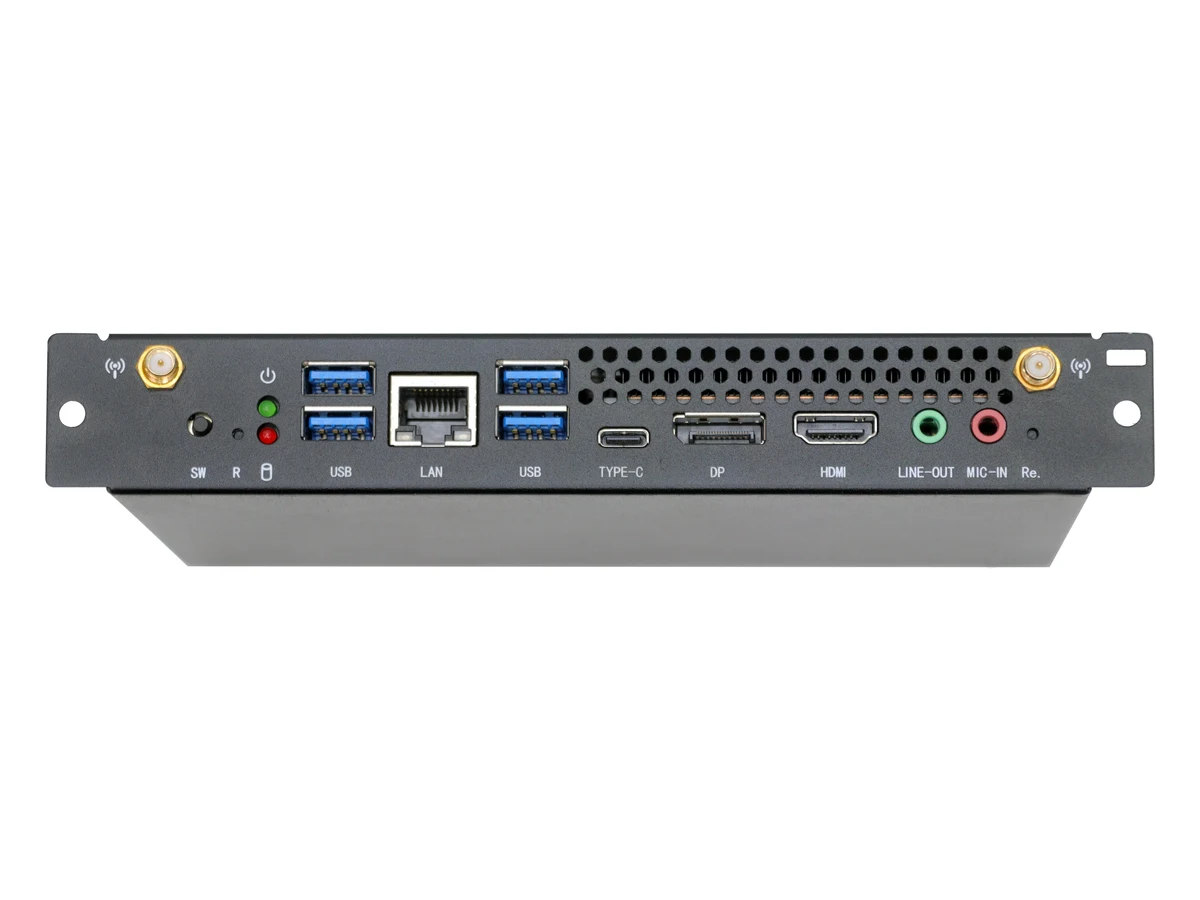
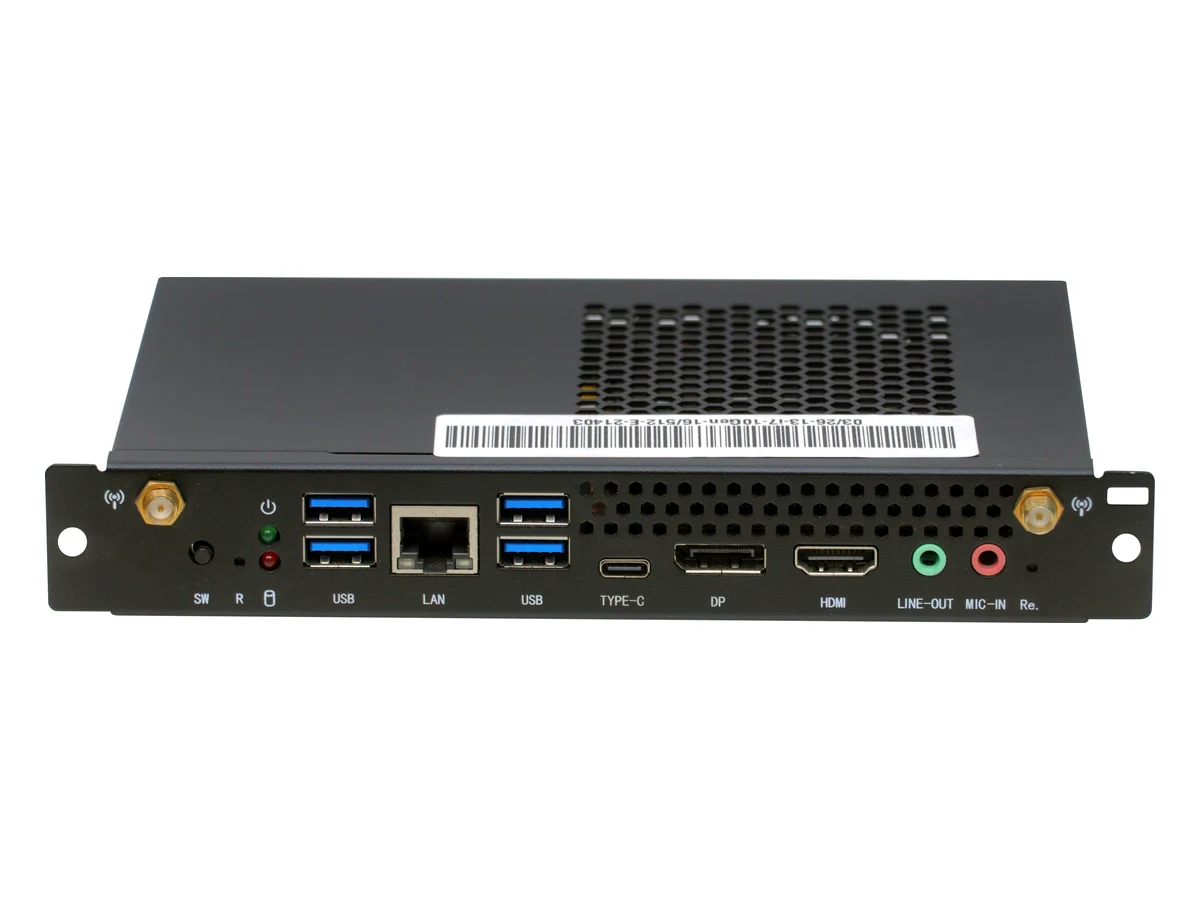
Visit the SNL StoreThe SNL OPS module slides into the OPS slot on the back of an SNL Interactive Flat Panel. Its front plate carries four USB ports, a LAN (RJ45) port, USB Type-C, DisplayPort, HDMI, LINE-OUT and MIC-IN jacks, two antenna connectors, a power switch and a reset button. On its back, the OPS connector plugs into the panel, beside a DC power jack. It runs on an Intel Core i5 (10th to 13th generation) or i7 (10th generation) processor; the memory, storage and Windows version are confirmed by the SNL team when you ask for a quote.
The SNL OPS module, group by group. A dash means the specification has not been supplied: memory, storage, the Windows version, the module’s size and its weight are confirmed by the SNL team when you ask for a quote.
| Processor | Intel Core i5, 10th, 11th, 12th or 13th generation; or Intel Core i7, 10th generation |
|---|---|
| Operating system | Windows Ready |
| Windows version | — |
| Memory | — |
| Storage | — |
| USB | 4 × USB (blue ports) |
|---|---|
| Network | 1 × LAN (RJ45) |
| USB Type-C | 1 × TYPE-C |
| Video output | 1 × DisplayPort (DP), 1 × HDMI |
| Audio | 1 × LINE-OUT, 1 × MIC-IN |
| Wireless | 2 × antenna connectors, marked with a wireless symbol |
| Power | Power switch (SW) |
|---|---|
| Reset | Reset button (R) |
| Indicators | Power LED and drive-activity LED |
| Connector | OPS connector on the back of the module (the OPS standard's 80-pin connector) |
|---|---|
| Signals | Power, video (HDMI/DVI and DisplayPort), USB, audio and control signals, all through the one connector |
| Power input | 12–19 V DC through the OPS connector (OPS standard) |
| Power jack | DC power jack on the back, beside the OPS connector |
| Video standard | Standard OPS: 4K at 60 Hz on a single display |
| Designed for | SNL Interactive Flat Panels, through the OPS slot on the back of the panel |
|---|---|
| Installation | Easy installation, Euro standard |
| Environments | Education, corporate and conference |
| Panel keeps | Android 14, touch and the AI Teaching Suite work as before |
| In the box | Not included with the panel; an optional add-on ordered separately |
| Enclosure | Black metal enclosure with honeycomb ventilation |
|---|---|
| Mounting | Screw-hole mounting ears at both ends of the front plate |
| Dimensions | — |
| Weight | — |
Intel Core i5 or i7, Windows Ready and designed for Interactive Flat Panels. Memory, storage and the Windows version are confirmed by the SNL team when you ask for a quote.
10th, 11th, 12th and 13th generation
Four processor generations to choose from.
10th generation (OPS)
The i7 option in the SNL OPS range.
Runs Windows on the panel
Windows applications run on the touchscreen.
Fits the panel’s OPS slot
Made to sit inside an SNL Interactive Flat Panel.
Euro standard
Slides into the slot on the back of the panel.
Intel processors
Built on Intel Core i5 and i7 processors.
With your Interactive Flat Panel
Power, video and USB pass through the slot.
Built for everyday use
Made to run day after day in a classroom or boardroom.
Environments
Schools, offices and meeting rooms.
The OPS connector carries power (12–19 V DC), video (HDMI/DVI and DisplayPort), USB, audio and control signals between the panel and the module. Around it, the module and the panel each have their own ports: HDMI, DisplayPort, USB Type-C, USB 3.0, USB 2.0, RJ45 and audio.
| Connection | SNL OPS module (front plate) | SNL IFP panel (datasheet) |
|---|---|---|
| Video | HDMI ×1, DisplayPort (DP) ×1 | HDMI IN ×2 and DP IN ×1 on the I/O panel; HDMI IN ×1 (2.0) on the front |
| USB | USB ×4 (blue ports) | USB 3.0 ×1, USB 2.0 ×1 and Touch USB 2.0 ×2 on the I/O panel; USB 3.0 ×2 and Touch USB ×1 on the front |
| USB Type-C | TYPE-C ×1 | Type-C ×1 on the I/O panel and ×1 on the front (the datasheet does not say whether they carry video) |
| Network | LAN (RJ45) ×1, plus two antenna connectors | RJ45 ×2 |
| Audio & mic | LINE-OUT ×1, MIC-IN ×1 | PC Audio IN ×1, (Mini) Line Out ×1, Optical Out ×1; no dedicated mic jack is listed |
| Controls | Power switch (SW), reset (R), power and drive LEDs | RS232 ×1 |
| To the panel | OPS connector on the back, beside a DC power jack | OPS slot with the matching connector |
OPS stands for Open Pluggable Specification. In computing, it is a standard for a small computer, called an OPS PC, OPS computer or OPS PC module, that slides into a dedicated slot on the back of a display and connects through a single 80-pin connector, so the display becomes a full computer without an external PC, tower or cable run. SNL’s Interactive Flat Panels support an optional OPS module.
The format was introduced in 2010 by Intel, NEC and Microsoft. It fixes the slot, the connector and the power supply between a display and the computer that drives it, so that a compliant module fits a compliant display.
A complete small computer: a processor, memory, storage and an operating system, plus its own ports, built to the standard’s size and connector. Modules exist on Intel and ARM processors running Windows or Android. The SNL OPS module is a Windows OPS PC built on Intel Core i5 (10th to 13th generation) or i7 (10th generation) processors, so it is an Intel OPS PC. Its memory and storage are not published on this page, so get in touch for the current configurations.
OPS+ is a later extension of the specification that adds a second connector, for 8K video or several 4K outputs. This page describes the standard OPS slot. It does not list OPS+ support for SNL panels, so get in touch if you need it.
Both are small computers, but a mini PC is a separate box that needs its own power supply and its own video, USB and audio cables to the display. An OPS module follows a fixed size and connector and slides into the display’s slot, so power, video, USB, audio and control signals pass through the panel itself.
OPS gives a smart board its own permanent PC. It is used where teaching or exam workflows depend on Windows-only software, such as specialised lab applications, legacy ERP clients and exam software, or where a school wants a dedicated computer on the panel without a laptop, a tower or loose cables. The rest of the time the panel works as normal.
No. The panel runs Android 14 with its AI teaching tools on its own, and Windows or Mac laptops can connect over HDMI, DisplayPort or wireless casting at any time. OPS is for a permanent Windows need, not a requirement.
No. Adding an OPS module takes nothing away: Android 14, touch and the AI Teaching Suite keep working as before, and the Windows module is an extra source on the same panel.
Yes, by connecting a Windows laptop or PC over HDMI, DisplayPort or wireless casting. The difference is that the computer then sits outside the panel and has to be connected each time, while an OPS module stays inside it.
The SNL IFP specification lists 40-point touch under Windows (Win 7/8/10) and 20-point touch under Android.
The front plate has four USB ports, one LAN (RJ45) port, one USB Type-C port, one DisplayPort, one HDMI port, LINE-OUT and MIC-IN audio jacks, two antenna connectors, a power switch and a reset button. The back carries the OPS connector and a DC power jack. The table above sets them beside the panel’s own ports.
Yes. The front plate is marked MIC-IN for a microphone and LINE-OUT for speakers or headphones. The panel itself lists PC Audio IN, (Mini) Line Out and Optical Out.
Yes. The front plate has one TYPE-C port and one DP (DisplayPort) port beside the HDMI port. This page does not say whether the Type-C port carries video, data or both, or which USB version each USB port supports, so get in touch before you plan a USB-C connection.
The standard OPS connector carries HDMI/DVI and DisplayPort video and supports 4K at 60 Hz on a single display; OPS+ raises that to 8K or several 4K outputs. The maximum for a specific SNL module depends on its Intel Core processor generation, so get in touch for the figure on the model you plan to buy.
Yes. The OPS module connects inside the panel, so the panel’s own ports stay free. The datasheet lists HDMI IN ×2 and DP IN ×1 on the I/O panel, and HDMI IN ×1 (2.0), USB 3.0 ×2, Touch USB ×1 and Type-C ×1 on the front. It does not say whether the Type-C ports carry video, so ask before planning a single-cable USB-C connection.
Not for the module’s connection to the panel: it plugs into the slot and the connector carries power, video, USB, audio and control. An SNL IFP’s box holds a remote, a power cable, a stylus pen, a wall bracket and a Wi-Fi antenna, and this page does not list HDMI, USB-C or USB extension cables or adapters. If you need one for a laptop or a camera, get in touch and tell the team what you are connecting.
SNL describes every Interactive Flat Panel in its range, from 55 to 98 inch, as supporting an optional OPS module through a slot on the back of the panel. When you ask for a quote, confirm the slot and the module for your exact model with the team.
OPS is an open standard, so compliant modules are designed to fit compliant slots. This page does not list third-party modules that SNL has tested, so confirm compatibility with the team before you buy a module for an SNL panel.
No. It is an optional add-on. The SNL IFP datasheet states that the OPS module is not included with the panel, so it has to be ordered separately.
The SNL OPS module is an Intel processor OPS PC. It comes as an Intel Core i5 OPS in the 10th, 11th, 12th or 13th generation (the OPS i5 PC module, including 12th Gen and 13th Gen Intel OPS options), or as an Intel Core i7 OPS in the 10th generation. It is Windows Ready and designed for Interactive Flat Panels. The specification lists no Core i3 or Core i9 model.
The module’s memory, storage and Windows version are not published on this page. Get in touch, say how you will use it (exam software, lab applications, everyday Windows apps) and the team will confirm the configuration.
It is listed as easy to install (Euro standard): the module slides into the OPS slot on the back of the panel, and its connector meets the panel’s connector. Get in touch if you want the team to confirm fitting for your setup.
No price is published on this page. OPS is optional, so it is added to the panel price only where a school needs a permanent Windows PC. Book a demo or get in touch for a quote covering the panel and the module.
This page does not state a warranty for the OPS module. Get in touch and ask for the warranty on the module and on the panel you plan to buy.
Book a demo and the SNL team will show you the panel and talk through whether OPS suits your classrooms.
Through SNL: book a demo or get in touch with the panel size, how many classrooms or rooms you are equipping and your location, and the team will quote the module with or without the panel. SNL supplies and supports its products across India.
Four things: the model or size of the SNL panel (or panels) the module is for, how many modules you need, the Windows software it must run (exam software, lab applications, ERP or everyday Office use) and the city you are in. That lets the team match a processor generation to the software and quote accurately.
The slot is on the back of the panel, behind a cover, and takes a module that slides straight in. SNL describes every Interactive Flat Panel in its range as supporting an optional OPS module, but confirm the slot for your exact model and the module you plan to fit with the team before you order.
That is one of the reasons for the standard. The module is a separate unit in a standard slot, so a faster or newer one can replace it later without replacing the panel, provided it is compatible with your panel. Ask the team to confirm compatibility before you buy an upgrade.
The module is listed as Windows Ready, but this page does not state which Windows version or edition is installed or licensed, because none was supplied. Get in touch with the SNL team and ask for the Windows version and licence terms for the module you plan to buy.
An OPS PC, also called an OPS computer or OPS PC module, is a small computer built to the Open Pluggable Specification so that it slides into the OPS slot on the back of a display. The SNL OPS PC is a Windows module for SNL Interactive Flat Panels.
The OPS slot is a bay on the back of the panel with a standard 80-pin connector inside. A compatible OPS module slides into it and connects to the panel directly, so the panel can use the module as a built-in Windows computer.
A slot-in PC is another name for an OPS module: a full computer on a card that slots into the back of the smart board instead of sitting beside it as a tower or a mini PC, with no extra power cable or video cable to the screen.
OPS is not a part inside an ordinary desktop. It is a standard for a computer that plugs into a display: Open Pluggable Specification. When people say “OPS in a computer” they usually mean an OPS PC module for a smart board or large display.
An OPS module that runs Windows. On an Interactive Flat Panel that already runs Android 14, a Windows OPS module adds a second source so Windows-only software can run on the board itself. The SNL OPS module is Windows Ready and built on Intel Core i5 and i7 processors.
SNL does not publish a price for the OPS module. It depends on the processor generation (Intel Core i5 or i7), the memory and storage configuration, the number of modules and whether it is bought with a panel, so book a demo or get in touch for a quote that matches your rooms.
No. OPS is a display standard, so any display with an OPS slot can take a module, including digital signage and large meeting-room screens. SNL offers its OPS module for SNL Interactive Flat Panels; this page does not list it for other displays.
The SNL OPS module is listed as easy to install, high performance (Intel processors), a seamless fit with the panel, stable and reliable in operation, and suited to education, corporate and conference rooms. In practice: Windows-only software on the board, one less box and cable run, and a computer you can swap or upgrade without replacing the panel.
For a permanent Windows need, yes: the computer is always on the board, nothing has to be carried into the room or plugged in before a lesson, and there is no cable to trip over. A laptop is still the better choice for a teacher who wants their own files and apps and moves between rooms. The panel supports both.
They solve different problems. The All-in-One PC is a desk-sized computer with its own 23.8-inch screen, for a lab, front desk or studio control panel. An OPS module has no screen of its own: it lives inside an Interactive Flat Panel and turns that big touch display into a Windows computer.
It depends on the software. The panel runs Android 14 with Google EDLA certification and the SNL AI teaching tools, which is enough for many classrooms. Add a Windows OPS module only if you need software that runs on Windows alone, such as certain lab, exam and ERP applications.
If the software runs on Windows and the module’s processor, memory and storage meet its requirements, yes. This page does not publish the module’s memory and storage, so get in touch with the name of the software and the team will confirm that the configuration fits it.
A Windows stick or dongle hangs off an HDMI port and needs its own power cable, so it adds wires behind the panel and is easy to knock out. An OPS module is built to a standard that carries power, video, USB, audio and control through one internal connector, so it sits inside the panel and is much harder to disturb.
A mini PC is cheaper to improvise but needs its own power supply and separate video, USB and audio cables to the panel, and it has to be mounted somewhere. An OPS module is designed to be the neat, standard version of the same idea.
A single 80-pin connector at the back of the module, which meets the matching connector inside the panel’s OPS slot. Everything the module needs from the panel and sends to it passes through that one connector.
Power, video (HDMI/DVI and DisplayPort), USB, audio and control signals between the panel and the module. That is why no separate video or power cable has to run from a Windows computer to the panel.
Under the OPS standard the panel supplies 12 to 19 V DC through the connector, so the module normally needs no power adapter of its own. The SNL module also has a DC power jack on its back; this page does not say what that jack is for, so ask the team if you plan to run it outside a panel.
The front plate has two antenna connectors, which points to wireless connectivity, but this page does not state whether Wi-Fi or Bluetooth is fitted or which versions, so get in touch to confirm before you rely on either. The module does have a wired LAN (RJ45) port.
Yes. The front plate has a power switch marked SW and a reset button marked R. This page does not describe how the module’s switch works with the panel’s own power control, so ask the team how your setup starts and shuts down.
The front plate has four USB ports and one USB Type-C port, enough for a keyboard, a mouse, a camera, a microphone array and a storage drive at once. The USB version of each port is not stated on this page.
Yes. Use a USB port for a webcam, a document camera or a USB conference camera such as a PTZ camera that works as a webcam, and the MIC-IN jack for a microphone. Check the connection of the model you want with the team.
The front plate has an HDMI port and a DisplayPort alongside the connection to the panel, which are the video outputs a second screen would use. This page does not list how many displays the module can drive at once or at what resolution, so get in touch if you need an extended desktop.
To give each board a permanent Windows computer. Teachers then open lab software, exam applications and school systems directly on the board instead of carrying a laptop between rooms, and IT manages one standard module per board rather than a laptop per teacher.
Exam software that runs on Windows can run on the module, which is one of the reasons schools add one. Check the exact software’s requirements, and ask for a demo of your test platform on the panel.
Yes, if the client runs on Windows. Legacy ERP and attendance clients are a typical reason schools choose OPS, because they often have no Android version. Web-based systems also work in the panel’s own Android browser.
Yes. The module runs Windows, so standard Windows applications, including Office, can be installed on it, subject to their own licences. Teachers then write on the board with the touch screen under Windows.
Yes. The module is listed as suited to education, corporate and conference environments, and coaching batches and training rooms often need Windows applications, recorded sessions or a fixed PC on the board.
Yes. With Windows on the panel you can run a video-conferencing application and connect a USB camera and microphone through the module’s USB and MIC-IN ports, then use the panel’s touch screen and large display for the call. SNL’s Conference Studio uses the same kind of equipment.
It is a Windows computer, so it needs the same care as one: Windows and application updates, antivirus and user accounts. Schools with an IT team usually fold the modules into their existing routine; others ask the SNL team what support is available for the module.
Yes, and it is one of the practical benefits of a standard slot: every panel takes the same kind of module, so a school can keep a common configuration, and a module can be moved to another panel if that is ever needed. Tell the team how many rooms you plan to equip when you ask for a quote.
No questions found. Try a different search term or category.
Ready to add Windows to your smart board? See how OPS fits the SNL Interactive Flat Panel, compare the ports above, or book a demo and talk it through with the SNL team. Need a standalone PC instead? See the All-in-One PC.
What educators and verified Amazon India buyers say about their SNL interactive panels and smart boards.
SNL’s SmartClass has transformed our classrooms with interactive tools that engage students and boost participation.
The board arrived right on time, and the packaging was solid. It looked exactly as shown and works beautifully.
SNL’s eLearning platform has made lesson planning easier, and students love the interactive learning experience.
Smooth writing in the glass surface. Easy screen share with other devices. PowerPoint, pdfs are working very well. Good product to me (Teacher).
The hardware from SNL is reliable, easy to use, and has enhanced our teaching and learning environment.
I am beyond impressed with its performance. The clarity of the display is outstanding, making every lesson engaging and visually appealing.
SNL’s personalized learning solutions have helped us cater to every student’s individual needs effectively.
Makes teaching easy... and effective. Absolute delight to work with this smart board. No lagging, super clarity, power saving etc.
SNL’s technology has streamlined our classrooms, making teaching more efficient with excellent support.
Click below to proceed with the payment:
Pay NowScan with any UPI app to pay: