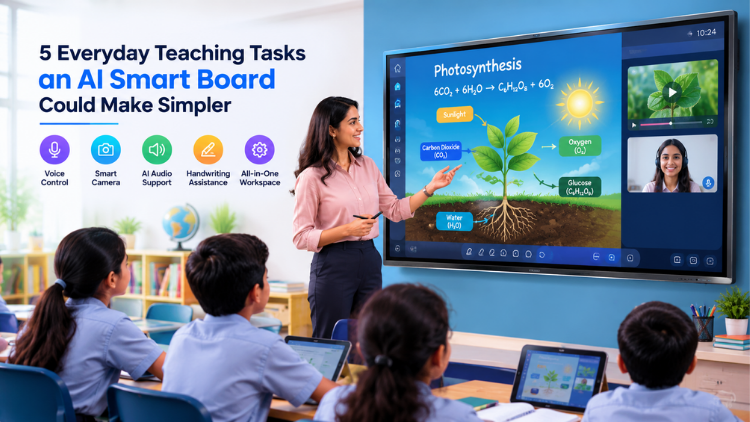
5 Everyday Teaching Tasks an AI Smart Board Could Make Simpler
What Makes an AI Smart Board Different?

5 Everyday Teaching Tasks an AI Smart Board Could Make Simpler

1. Preparing and Presenting Lesson Content
2. Writing, Annotating, and Explaining Concepts
3. Managing Hybrid and Online Lessons
4. Keeping Students Involved During Lessons
5. Reducing Everyday Classroom Technology Friction
Does AI Really Make a Teacher's Job Easier?
- Teacher training: Teachers need hands-on experience to know when the tools add value.
- Infrastructure: Connectivity, software, audio-video equipment, and compatible devices may be necessary.
- Teaching strategy: AI should support lesson objectives rather than become the focus.
AI Smart Board vs Conventional Interactive Panel

| Capability | Conventional Interactive Flat Panel | AI Interactive Flat Panel |
| Touch Interaction | Yes | Yes |
| Digital Annotation | Yes | Yes |
| Multimedia Teaching | Yes | Yes |
| Voice-Related Functions | Model dependent | Available on supported systems |
| Intelligent Camera Features | Limited/Model dependent | Available on supported systems |
| AI-Assisted Audio | Model dependent | Available on supported systems |
| Gesture Recognition | Limited/Model dependent | Available on supported systems |
| Handwriting Recognition | Model dependent | Available on supported systems |
| AI-Assisted Functions | Limited | More Extensive on supported systems |
What Should Schools Consider Before Choosing an AI-Powered Interactive Panel?

Evaluate classroom needs rather than selecting a product simply because it carries an AI label.
- Classroom requirements: Identify subjects, lesson formats, and teaching workflows.
- Specific AI features: Check included functions and whether extra hardware or software is required.
- Display quality: Evaluate resolution, brightness, viewing angles, and eye comfort.
- Touch responsiveness: Test writing, multi-touch, and annotation.
- Camera capabilities: Check framing, tracking, image quality, and hybrid-learning compatibility.
- Microphone and audio quality: Evaluate voice pickup, speakers, and noise handling.
- Operating system: Confirm support for required applications.
- Software compatibility: Check conferencing, content, screen-sharing, and learning tools.
- Connectivity: Review wired and wireless options.
- Teacher training: Ask how teachers will learn the system.
- Warranty and technical support: Understand service coverage and response times.
- Privacy and security: Review data handling, permissions, updates, and account controls.
The Future of AI-Powered Classrooms

Conclusion
Frequently Asked Questions (FAQs)
Yes, an AI smart board can simplify several routine teaching and classroom technology tasks when its features match the teacher's requirements. Depending on the model, it may support voice interaction, intelligent camera functions, handwriting recognition, smart annotation, gesture recognition, and AI-assisted audio. These capabilities can help teachers manage digital content, conduct interactive lessons, and support hybrid learning from a more integrated classroom environment. However, AI does not replace teachers or eliminate the need for lesson planning. Its effectiveness depends on teacher training, software compatibility, classroom infrastructure, connectivity, and how thoughtfully the technology is incorporated into everyday teaching.
An AI interactive flat panel is a large touchscreen classroom display that combines interactive display technology with selected artificial intelligence capabilities. In addition to digital writing, presentations, multimedia content, and screen sharing, compatible models may offer features such as voice recognition, intelligent camera processing, AI-assisted microphones, gesture recognition, or handwriting recognition. These capabilities can provide teachers and students with additional ways to interact with digital content. However, AI functionality varies between manufacturers and models. Schools should check the exact specifications, required software, connected hardware, and available features before deciding whether a particular panel meets their classroom requirements.
An AI smart board can potentially simplify several everyday classroom tasks, including presenting lesson content, writing and annotating digitally, managing hybrid classes, conducting interactive activities, and switching between different classroom technology tools. Teachers can use an interactive display to combine presentations, videos, websites, diagrams, digital textbooks, and handwritten explanations. Depending on the model, AI features may further support voice interaction, intelligent camera functions, or audio processing. The goal is not to automate teaching but to reduce unnecessary technology-related steps. Teachers still control the lesson, choose appropriate resources, and decide how technology supports their learning objectives.
An AI interactive flat panel can provide teachers with a central workspace for delivering multimedia lessons. Instead of relying on separate tools for presentations, videos, websites, diagrams, and digital annotation, teachers can access and interact with multiple types of content through the display. Some compatible systems may also provide AI-assisted content or organization features. For example, a teacher could display a science diagram, annotate it, play a related video, and return to the annotated explanation during the same lesson. AI features vary by product, so teachers should verify the specific capabilities available rather than assuming that every panel provides the same functionality.
An AI interactive flat panel can combine touchscreen writing with digital annotation tools, allowing teachers to write, highlight, draw, erase, move, and save information directly on the display. Some models may include handwriting recognition that can convert handwritten content into digital text. This can be particularly useful for mathematics, science diagrams, language lessons, and step-by-step explanations. Teachers can also combine handwritten notes with presentations, images, videos, and other digital resources. However, handwriting and AI annotation capabilities differ across products. Schools should test writing accuracy, touch responsiveness, pen performance, and available software before selecting a panel.
Yes, an AI smart board can support hybrid teaching when combined with compatible cameras, microphones, conferencing software, and reliable internet connectivity. Depending on the system, AI-enabled camera functions may provide auto-framing, speaker tracking, or participant detection, while AI-assisted audio may support voice pickup and noise reduction. Teachers can display lesson content and remote participants while continuing to annotate the screen. However, a smart board alone does not create an effective hybrid classroom. Schools also need suitable networking, acoustics, camera positioning, conferencing applications, and teacher training. Privacy and data-handling practices should also be considered when cameras, microphones, and cloud-based services are used.
An AI interactive flat panel can create additional opportunities for students to participate through touchscreen activities, quizzes, collaborative exercises, digital diagrams, multimedia resources, and interactive presentations. Depending on the model, voice or gesture-based features may provide further ways to interact with digital content. However, simply installing an AI-enabled panel does not automatically increase student engagement or improve learning outcomes. Engagement depends on how teachers design activities, explain concepts, encourage participation, and connect technology with learning objectives. The most effective approach is to use AI and interactive features where they genuinely improve an activity rather than using technology simply because it is available.
Teachers should focus on features that solve genuine classroom challenges. Depending on their requirements, useful capabilities may include voice recognition, intelligent camera functions, AI-assisted microphones, noise reduction, gesture recognition, handwriting recognition, smart annotation, automated framing, and collaboration tools. Beyond AI, teachers should also evaluate screen quality, touch responsiveness, operating system, educational software compatibility, connectivity, audio performance, and ease of use. A live demonstration is valuable because specifications do not always reveal how convenient a feature is during an actual lesson. The best panel is not necessarily the one with the most AI features, but the one that teachers can use effectively.
An AI smart board is not automatically better than a traditional interactive panel for every classroom. A conventional interactive panel can already provide touchscreen interaction, digital annotation, multimedia teaching, presentations, and collaboration. AI-enabled models may add capabilities such as intelligent camera processing, voice interaction, AI-assisted audio, gesture recognition, or handwriting recognition, depending on the product. The better option depends on the school's requirements, budget, infrastructure, software ecosystem, and expected usage. Schools should compare specific features rather than product labels. A panel with fewer features may be more suitable if those features align closely with teachers' actual classroom needs.
Before purchasing an AI interactive flat panel, schools should evaluate classroom requirements, display quality, touch responsiveness, processing performance, operating system, connectivity, software compatibility, camera and microphone capabilities, AI functions, warranty, installation, technical support, and total cost of ownership. Schools should also determine whether particular AI features are built into the panel or require additional hardware, applications, internet access, or subscriptions. Teachers should ideally participate in a live product demonstration to test everyday functions. Institutions should also review privacy and security considerations, particularly when cameras, microphones, cloud platforms, or AI-powered applications are used with students and teachers.
Related post:
- How to Select the Right Interactive Panel for Classroom Based on School Requirements
- Smart Board for Teaching: 5 Questions Every School Should Ask Before Buying
- Smart Board for Teaching Price? Everything Schools Should Know
- The Future of Smart Board in Indian Education
- Interactive Panel Myths Debunked: 5 Things Every School Should Know
- The Future of Smart Classrooms: Why Digital Board Is Becoming Essential
- Dept of Agricultural Research and Education, Uttarakhand Chooses SmartSchool Education for Advanced Digital Learning Solutions
- The Role of Interactive Panels in Creating Smart Classrooms
- The Future of Smart Classrooms with Interactive Flat Panels
- How an Interactive Flat Panel Improves Learning Outcomes