Can an Interactive Flat Panel with AI Become a Teacher’s Digital Assistant?
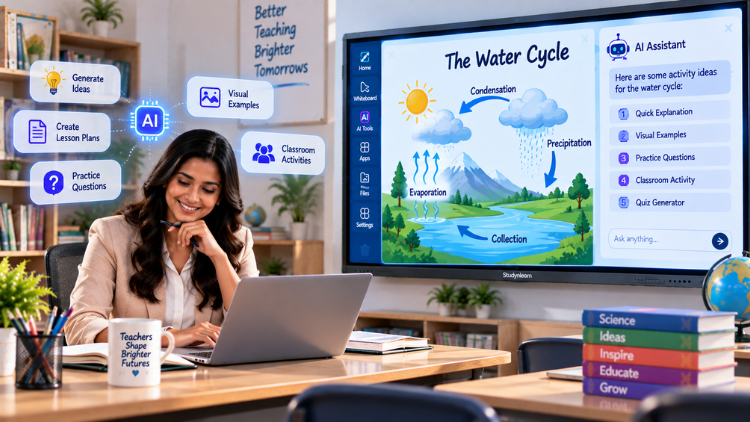
What Is an AI-Enabled Interactive Flat Panel?

- A large touch-enabled display
- Digital writing and annotation
- Multimedia presentation
- Connectivity and screen sharing
- Interactive classroom software
- Selected AI capabilities
How Can It Act as a Teacher’s Digital Assistant?

1. Helping Teachers Prepare Lesson Ideas
2. Making Difficult Concepts Easier to Explain
- Science diagrams and processes
- Mathematical steps
- Historical timelines
- Geography maps
- Language explanations
- Process-based learning
3. Creating Questions and Classroom Activities
4. Supporting Different Learning Levels
5. Encouraging Student Participation
- Student annotation
- Interactive problem-solving
- Group brainstorming
- On-screen quizzes
- Collaborative explanations
- Student presentations
- Visual demonstrations
6. Supporting Hybrid and Digital Learning
- Digital learning resources
- Screen sharing
- Video conferencing
- Remote collaboration
- Recorded explanations
- Multimedia content
7. Reducing the Need to Switch Between Multiple Tools
A Practical Classroom Example

- The teacher introduces the topic using a visual presentation.
- The panel displays planets and their positions.
- Students annotate the display and identify planets.
- The teacher creates a quick revision activity.
- Students discuss their answers and present what they learned.
Traditional Display vs AI-Enabled Interactive Panel

| Traditional Classroom Display | AI-Enabled Interactive Panel |
| Mainly presents prepared content | Presents content and may support AI-assisted activities |
| Limited interaction | Touch interaction and annotation |
| Separate tools may be needed | Multiple classroom functions may be combined |
| Mostly fixed explanations | May support alternative explanations and examples |
| Teacher manually prepares every activity | AI may assist with selected content tasks |
Can AI Really Replace a Teacher?

What Should Schools Check Before Choosing an AI-Enabled Panel?

- Display size, resolution, and touch accuracy
- Processor, memory, and operating system
- Available AI features and supported applications
- Connectivity and screen-sharing options
- Audio, microphone, and camera compatibility
- Data privacy and security
- Software updates and warranty
- After-sales support and teacher training
- Ease of use and total ownership cost
Conclusion
Frequently Asked Questions (FAQs)
Yes, an interactive flat panel with AI can support teachers like a digital assistant by helping with selected classroom and lesson-preparation tasks. Depending on the device and software, it may assist with generating examples, preparing questions, simplifying explanations, organising ideas, and creating interactive learning activities. Teachers can also use the panel for digital writing, annotation, multimedia lessons, and student collaboration. However, it does not replace the teacher’s professional judgment, creativity, classroom management, or personal connection with students. Its value depends on the available AI tools, teacher training, curriculum requirements, and how effectively the technology is integrated into everyday teaching.
An AI smart board is an interactive classroom display that combines touch-based teaching features with artificial intelligence-supported tools. Along with displaying presentations, videos, diagrams, and digital lessons, it may help teachers generate examples, create questions, simplify explanations, or explore learning content. The exact features depend on the model, operating system, software, and AI services connected to the board. An AI smart board should be viewed as a teaching-support tool rather than an independent teacher. Schools should evaluate its actual capabilities, ease of use, security, software updates, and compatibility with their teaching requirements before making a purchase.
AI-powered interactive panels can help teachers prepare lessons by supporting tasks such as brainstorming, creating examples, developing discussion questions, organising topics, and preparing classroom activities. For instance, a teacher planning a science lesson may use supported AI tools to generate age-appropriate examples or create a short revision quiz. The teacher can then display, edit, annotate, and discuss the material directly on the panel. AI-generated content should always be reviewed for accuracy, curriculum alignment, age suitability, and clarity. The technology can reduce some preparation effort, but teachers remain responsible for selecting and adapting the final learning material.
An AI smart classroom can support learning by combining interactive displays, digital content, classroom collaboration, and selected AI-assisted teaching functions. Students may benefit from more visual explanations, interactive activities, digital demonstrations, and opportunities to participate directly in lessons. Teachers may also use AI tools to create alternative examples, practice questions, or explanations for different learning levels. However, improved learning is not guaranteed simply by installing technology. Effective teaching methods, appropriate content, teacher training, student participation, and reliable infrastructure remain important. The best results come when AI-enabled classroom tools are used purposefully to support clear learning objectives.
An interactive flat panel with AI may help teachers create classroom questions, quizzes, revision tasks, and discussion prompts, depending on the software and AI features available. A teacher could request multiple-choice questions, short-answer questions, topic-based practice, or questions at different difficulty levels. These activities can then be displayed on the interactive panel for individual or group participation. Teachers should carefully review AI-generated questions to ensure that they are factually correct, suitable for the students’ age, aligned with the curriculum, and free from confusing wording. AI can speed up idea generation, but teacher review is still essential for quality learning content.
An AI smart board may support personalised learning by helping teachers prepare different explanations, examples, activities, and practice questions for students with varied learning needs. For example, a teacher may create a simpler explanation for students who need additional support and more challenging questions for advanced learners. AI tools may also help present the same concept through text, visuals, examples, or step-by-step explanations. However, AI cannot automatically understand every student perfectly. Teachers must use assessment results, classroom observation, and their professional knowledge to decide what each learner needs. Personalised learning works best when AI assistance is combined with thoughtful teacher guidance.
No, an AI smart classroom does not replace teachers. It provides technology that can support lesson preparation, content presentation, classroom interaction, and selected teaching tasks. Teachers continue to play the central role in explaining concepts, motivating students, managing classroom behaviour, understanding emotions, encouraging critical thinking, and making educational decisions. AI-generated information may also contain errors or lack context, so teachers must review and adapt it before use. The most effective approach is a partnership between educators and technology. AI can assist with repetitive or content-related tasks, while teachers provide the human judgment, empathy, creativity, and leadership essential to learning.
Schools should look at both standard interactive-panel features and AI-related capabilities. Important factors include display size, resolution, touch accuracy, processor performance, memory, operating system, supported applications, connectivity, screen sharing, audio quality, camera compatibility, and ease of use. For AI functions, schools should ask which tools are included, whether internet access is required, how updates are provided, and whether the features support real classroom needs. Data privacy, security, warranty, after-sales service, teacher training, and long-term support are equally important. Schools should request a practical demonstration instead of relying only on the product’s AI branding.
An interactive flat panel with AI can offer several potential benefits when used appropriately. It may help teachers prepare examples, generate questions, simplify explanations, display multimedia content, and create more interactive lessons. Its touch and annotation functions can support student participation, collaborative problem-solving, and visual learning. AI-enabled tools may also help educators adapt content for different learning levels or explore ideas during a lesson. However, benefits vary according to the device, software, teacher readiness, and school infrastructure. Schools should focus on practical classroom requirements and teacher training rather than assuming that advanced technology alone will automatically improve educational outcomes.
Investing in an AI smart board may be worthwhile if it solves real classroom challenges and fits the school’s teaching strategy. It can support interactive lessons, visual explanations, digital content, collaboration, and selected AI-assisted tasks. Before investing, schools should evaluate the panel’s actual AI capabilities, display quality, software compatibility, connectivity, security, warranty, maintenance, and teacher training requirements. It is also important to check whether the AI features are useful for the school’s subjects and student age groups. A successful implementation requires more than hardware; it needs reliable infrastructure, suitable digital resources, teacher support, and a clear plan for classroom use.
Related post:
- 5 Everyday Teaching Tasks an AI Smart Board Could Make Simpler
- How to Select the Right Interactive Panel for Classroom Based on School Requirements
- Smart Board for Teaching: 5 Questions Every School Should Ask Before Buying
- Smart Board for Teaching Price? Everything Schools Should Know
- The Future of Smart Board in Indian Education
- Interactive Panel Myths Debunked: 5 Things Every School Should Know
- The Future of Smart Classrooms: Why Digital Board Is Becoming Essential
- Dept of Agricultural Research and Education, Uttarakhand Chooses SmartSchool Education for Advanced Digital Learning Solutions
- The Role of Interactive Panels in Creating Smart Classrooms
- The Future of Smart Classrooms with Interactive Flat Panels