5 Things an Interactive Flat Panel with AI Can Help Teachers Do
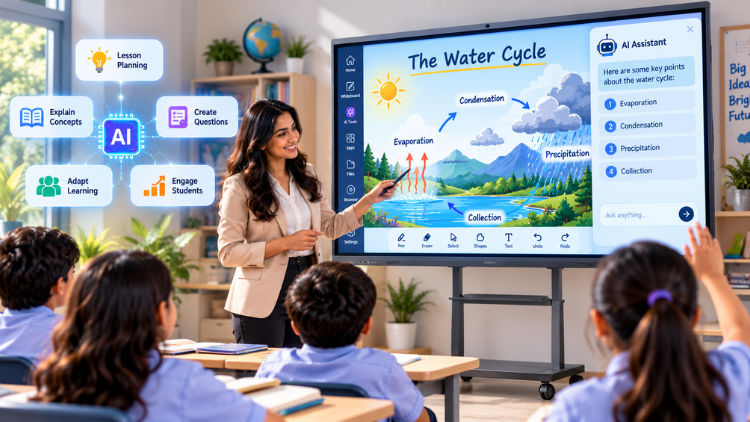
What Is an Interactive Panel with AI?

5 Things an Interactive Flat Panel with AI Can Help Teachers Do
1. Prepare Lesson Ideas More Efficiently

2. Explain Difficult Concepts in Different Ways

3. Create Questions, Quizzes and Classroom Activities

- Factual accuracy
- Difficulty level
- Age suitability
- Curriculum relevance
- Clarity of wording
4. Support Different Learning Levels

5. Make Classroom Interaction More Collaborative

What Could This Look Like in a Real Lesson?

Traditional vs AI-Enabled Interactive Teaching

| Traditional Classroom Approach | AI-Enabled Interactive Approach |
| Prepared content is mainly displayed | Content can be explored interactively |
| Teacher manually creates most examples | AI may assist with example generation |
| Limited on-screen participation | Students can interact with displayed content |
| Separate tools may be needed | Multiple classroom functions can be combined |
| Explanations may follow one format | Teachers can explore alternative explanations |
Does AI Replace the Teacher?

What Should Teachers Check Before Using AI-Powered Panels?

- Ease of use and touch responsiveness
- Display quality
- Actual AI capabilities and supported applications
- Internet and connectivity requirements
- Screen sharing
- Audio and camera compatibility
- Software updates
- Privacy and security
- Teacher training
- Technical support
- Warranty
Potential Benefits and Limitations

Conclusion
Frequently Asked Questions (FAQs)
An interactive flat panel with AI can support teachers with several everyday classroom tasks, including preparing lesson ideas, creating examples, developing questions, explaining difficult concepts, and designing interactive activities. Depending on the available software, teachers may also use AI tools to adapt explanations for different learning levels or generate revision material. The panel itself can support touch interaction, annotation, multimedia content, screen sharing, and collaborative activities. However, its capabilities vary by model and software. Teachers should review AI-generated information before using it in class to ensure accuracy, curriculum alignment, age suitability, and relevance to their students.
An AI smart board may assist teachers during lesson preparation by helping generate ideas, examples, discussion questions, practice activities, and revision material. For example, a teacher preparing a science lesson could use supported AI tools to create age-appropriate examples or questions around a particular topic. The teacher can then review, edit, and present the material through the interactive display. AI should be treated as an assistance tool rather than an automatic lesson planner. Teachers remain responsible for ensuring that the content matches curriculum requirements, learning objectives, student ability levels, and classroom context.
Yes, AI-enabled classroom technology can help teachers explore different ways of explaining complex concepts. Depending on the available tools, teachers may request simpler explanations, real-world examples, step-by-step descriptions, practice questions, or alternative approaches to a topic. These resources can then be presented interactively using the classroom display. For example, a teacher could use visual explanations when teaching a scientific process or work through multiple examples while teaching mathematics. However, teachers should verify AI-generated information before presenting it to students because AI systems can sometimes produce inaccurate or incomplete responses.
A digital board can make lessons more interactive by allowing teachers and students to engage directly with digital content. Teachers can write, draw, annotate diagrams, display videos, solve problems, and conduct interactive exercises on the screen. Students can also participate in activities such as group problem-solving, brainstorming, presentations, and on-screen demonstrations. When AI-supported tools are available, teachers may additionally generate questions, examples, or activity ideas during lesson preparation or classroom delivery. Technology alone does not guarantee engagement, however. Effective lesson planning, teacher guidance, appropriate content, and meaningful student participation remain essential.
An interactive flat panel with AI may support personalised learning by helping teachers create different explanations, examples, or practice activities for students with varying learning requirements. A teacher could prepare a simpler explanation for students who need additional support or create more challenging questions for students who are ready for advanced work. AI can also help present ideas in different formats, depending on the available software. However, AI cannot automatically understand every student's needs. Teachers should use assessment, observation, student feedback, and professional judgment to decide how content should be adapted. Personalisation works best when technology supports, rather than replaces, teacher decision-making.
An AI smart board may help teachers generate quizzes, multiple-choice questions, short-answer questions, discussion prompts, and revision activities, depending on its AI software and available applications. This can give teachers additional ideas when preparing classroom activities. Once created, questions can be displayed on the interactive panel for individual or group participation. Teachers should always review AI-generated questions before using them. They should check factual accuracy, difficulty level, language, curriculum relevance, and suitability for the students' age group. AI can assist with generating content, but the teacher remains responsible for deciding whether a question is educationally appropriate.
No, an AI smart board does not replace a teacher. It is designed to support selected teaching and classroom tasks, such as preparing examples, generating questions, displaying content, annotating lessons, and supporting interactive activities. Teachers continue to provide human judgment, classroom management, motivation, emotional support, mentoring, and contextual understanding. They also decide how technology should be used and verify AI-generated information before presenting it to students. The most effective approach is to use AI as a teaching aid that extends the teacher's capabilities. Technology can assist with certain tasks, but it cannot replace the complete human role of an educator.
A digital board generally refers to a digital classroom display used for presenting content, writing, annotation, multimedia lessons, and interactive activities. An AI-enabled interactive panel can provide these functions while also incorporating artificial intelligence-supported capabilities, depending on the device and software. These may include generating examples, creating questions, assisting with explanations, or supporting other content-related tasks. The exact difference varies between products because not every AI-enabled panel provides the same functions. Schools should therefore examine the actual AI tools, operating system, applications, connectivity, security, and update support instead of assuming that every product labelled “AI” has identical capabilities.
Schools should evaluate both classroom requirements and technical specifications before purchasing an AI-enabled interactive panel. Important factors include display size, resolution, touch responsiveness, processor and memory, operating system, supported applications, connectivity, screen sharing, audio, camera compatibility, AI capabilities, security, software updates, warranty, and after-sales support. Schools should also determine whether the AI functions are genuinely useful for their teachers and curriculum. Teacher training is another important consideration because advanced features provide limited value if educators are not comfortable using them. A practical demonstration can help schools understand how the panel performs in real teaching situations.
An AI smart board can be a worthwhile investment when its features address genuine classroom requirements and teachers are prepared to use them effectively. It can support interactive teaching, visual explanations, digital content, classroom activities, and selected AI-assisted tasks. However, schools should not choose a panel simply because it includes AI features. They should assess display quality, software capabilities, connectivity, security, support, warranty, teacher training, and long-term usability. It is also important to understand which AI functions are included and whether they require additional software or services. A successful investment combines appropriate technology with good teaching practices, digital resources, infrastructure, and ongoing teacher support.
Related post:
- Can an Interactive Flat Panel with AI Become a Teacher’s Digital Assistant?
- 5 Everyday Teaching Tasks an AI Smart Board Could Make Simpler
- How to Select the Right Interactive Panel for Classroom Based on School Requirements
- Smart Board for Teaching: 5 Questions Every School Should Ask Before Buying
- Smart Board for Teaching Price? Everything Schools Should Know
- The Future of Smart Board in Indian Education
- Interactive Panel Myths Debunked: 5 Things Every School Should Know
- The Future of Smart Classrooms: Why Digital Board Is Becoming Essential
- Dept of Agricultural Research and Education, Uttarakhand Chooses SmartSchool Education for Advanced Digital Learning Solutions
- The Role of Interactive Panels in Creating Smart Classrooms